

Fees
Term bills, payments, receipts and who owes.
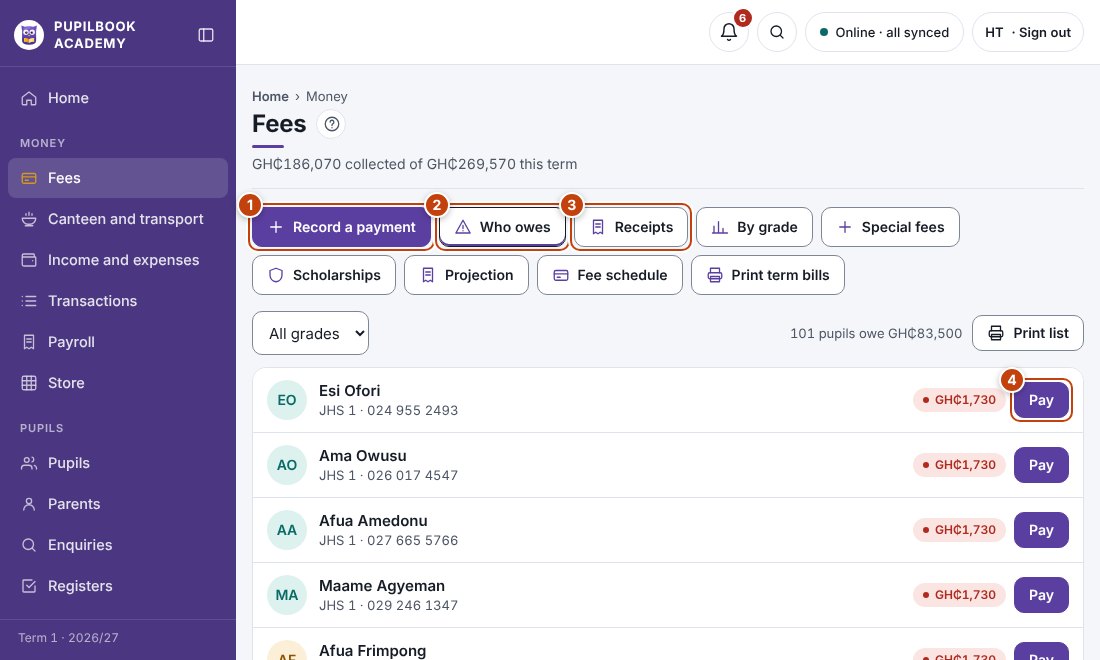
In the picture: 1 Record a payment · 2 Who owes · 3 Receipts · 4 Take a payment for this pupil.
Record a payment
Section titled “Record a payment”- Click Record a payment.
- Find the pupil by name or admission number.
- Enter the amount, how it was paid and who received it, then save.
- The receipt opens. Print it or share it by WhatsApp.
See who owes
Section titled “See who owes”- Open Who owes. Filter by grade if you need to.
- Click Print list for a debtors list.
Print term bills
Section titled “Print term bills”Click Print term bills and choose who to print for.
Special fees and scholarships
Section titled “Special fees and scholarships”- Special fees charges one-off items to chosen pupils.
- Scholarships gives a pupil a discount on termly fees.
- Fee amounts per grade are set in School setup, under Fees, or with Bulk upload.
- Paying more than the bill leaves a credit on the pupil.