

Messages
SMS to parents and staff.
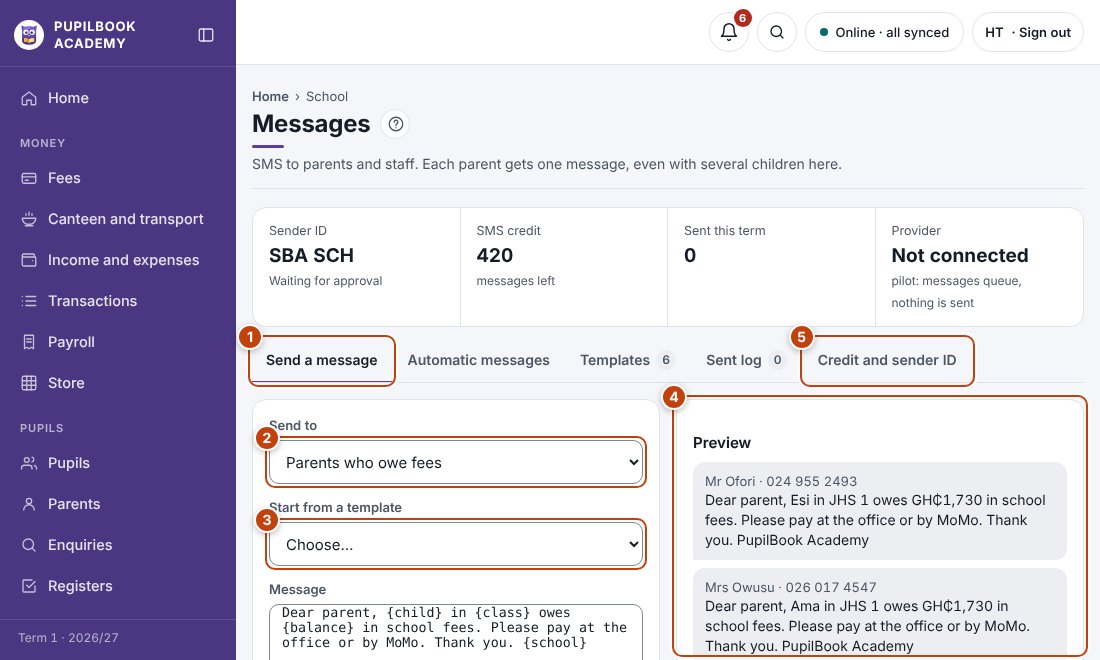
In the picture: 1 Send a message · 2 Choose who gets it · 3 Pick a ready-made message · 4 Check it before sending · 5 SMS credit and sender name.
Send a message
Section titled “Send a message”- Choose who to send to.
- Start from a template or type your own.
- Check the preview, then send.
Automatic messages
Section titled “Automatic messages”Turn on payment receipts, absence alerts and the others. They go out by themselves.
Credit and sender ID
Section titled “Credit and sender ID”See how many texts are left and the name parents see the message from.
- Each parent gets one message, even with several children here.
- Long messages count as two or more texts. The counter shows how many.